original:
  author: Greg
  url: "https://x.com/Greg_Nazario/status/1753136707988525112"
note: 纯机翻、未核对
问题
构建者们问我:“我如何在 Aptos 上使用对象,以及为什么要使用它们?”
解释涉及到并行性、gas 成本,以及概念上的区别。
中文
早上好,谁对又一期的DailyMove感到兴奋?
今天,我们将开始一个关于 Aptos 上的对象的系列,以便利贴为例。
很容易想象,你可以传递便利贴,也可以将便利贴附加到其他便利贴上。这是对象的一个完美的使用案例!
我们首先将以两种方法为例:
- 存储在资源中的结构
- 存储在对象中的结构
这是 StickyNote 结构;它只有一个消息(任意长度)。

首先让我们探索基于资源的方法:
我们在这里可以看到,我们直接将 StickyNotes 存储在一个 StickyNoteBoard 中。该板直接将 StickyNotes 存储在其中。
这意味着 StickyNoteBoard 将保存所有的消息以及涉及的内存和gas成本。

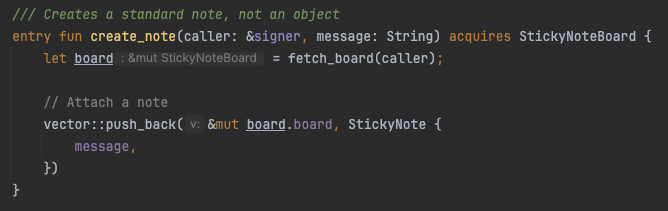
创建笔记在这里是简单的。板只需将新的便条添加到板上即可。
这个向量可以变得非常大,并且是可变大小的,因为消息是可变大小的。

现在,最重要的功能,让我们将笔记转移到另一个帐户。我们可以看到,实际上我们必须转移整个StickyNote。
记住我提到的消息是任意长度吗?这意味着gas费用随消息长度而变化。

现在让我们看一下对象路径:
在这个层面上,我们可以看到有一些更复杂。我们创建一个对象,并将StickyNote存储在该对象中,类似于一个帐户。
然后我们存储 Object<StickyNote>,它只是笔记的地址。

我创建的函数用于创建对象,其中包含代码以允许不同类型的对象。你可以事先定义是否要允许:
- 删除对象
- 转移对象
- 扩展对象
对于这个演示,我们将启用所有功能以供未来灵活使用。

对象的优点之一是gas成本。数字资产标准中的一个示例就是这样的。
传统标准可能需要0.000512 APT的gas费用直接转移NFT[1]
数字资产标准只需0.000004 APT的gas费用[2]
[1] https://explorer.aptoslabs.com/txn/430080783?network=mainnet
[2] https://explorer.aptoslabs.com/txn/430824583?network=mainnet
其他优点包括并行性和可扩展性。
在这个示例中,我们当前的实现并不针对并行性或大量笔记进行优化。
但是,在未来的一集DailyMove中我们会涵盖这两个方面。
感谢阅读!
[https://github.com/aptos-labs/daily-move/blob/main/snippets/objects/sources/sticky_note.move](https://
Question
Builders were asking me, “How do I use Objects on Aptos, and why would I use them?”
The explanation went into parallelization, gas costs, and conceptually the differences.
English
gm, who’s excited for another
Today, we’re going to start a series on Objects on Aptos, with sticky notes.
It’s easy to imagine, you can pass sticky notes around, and you can attach sticky notes to others. A perfect use case for objects!
We’re going to first use this as an example of two approaches:
- Structs stored in resources
- Structs stored in objects
Here’s the StickyNote struct; it has just a single message on it (of any length).
https://pbs.twimg.com/media/GFRdzTpbMAAWZse?format=png&name=small
Let’s explore the resource based approach first:
We can see here, we’re storing StickyNotes directly in a StickyNoteBoard. The board stores the StickyNotes directly in it.
This means that the StickyNoteBoard will hold all the messages and the memory involved and the gas cost.
https://pbs.twimg.com/media/GFReCNbbAAAFJK0?format=png&name=900x900
Creation of notes are simple here. The board simply adds a new note to the board.
This vector can get very large, and is of variable size, since the message is of variable size.
https://pbs.twimg.com/media/GFRepmMbYAAsG2h?format=png&name=small
https://pbs.twimg.com/media/GFRexQ0bkAAK-pK?format=png&name=900x900
Now, the most important feature, let’s transfer the notes to another account. We can see here, that we actually have to transfer the whole StickyNote.
Remember that I mentioned that the message is arbitrary in length? It means the gas fees change with the length of the message
https://pbs.twimg.com/media/GFRe_0Qa4AAYmLe?format=png&name=900x900
Let’s now take a look at the object path:
We can see at this level, there’s a little more complexity. We create an object, and store the StickyNote at that object, similarly to an account.
Then we store the Object<StickyNote>, which is just the address of the note.
https://pbs.twimg.com/media/GFRhVUZacAA3LWl?format=png&name=900x900
The function I created to create an object has code allowing for different types of objects. You can define up front whether you want to allow:
- Deleting the object
- Transferring the object
- Extending the object
For this demo we’ll enable all for future flexibility.
https://pbs.twimg.com/media/GFRhsmNbYAAZvhC?format=png&name=900x900
The beauty of the objects is that the owner of the object is built into it.
In this case, when moving the sticky notes from one board to another, we just move the address, and change the owner.
2 fields with fixed length, and therefore fixed gas cost.
https://pbs.twimg.com/media/GFRiI4DawAEEyVC?format=jpg&name=medium
Just one of the advantages of objects can be the gas cost. One of the examples is in the Digital Asset standard.
Legacy standard could take 0.000512 APT in gas to transfer an NFT directly [1]
Digital asset standard can take only 0.000004 APT in gas to transfer [2]
[1] https://explorer.aptoslabs.com/txn/430080783?network=mainnet
[2] https://explorer.aptoslabs.com/txn/430824583?network=mainnet
Other advantages include parallelism and extensibility.
Our current implementation in this example, is not optimized for parallelism, or large amounts of notes.
But, we’ll cover both in a future episode of
Thanks for reading!
https://github.com/aptos-labs/daily-move/blob/main/snippets/objects/sources/sticky_note.move